


Fleet Commander
전략 | Cat Studio
5억명 이상의 게이머가 신뢰하는 안드로이드 게임 플랫폼 BlueStacks으로 PC에서 플레이하세요.

Fleet Commander PC에서 즐겨보세요
이것은 장대 한 은하 전함 전략 게임입니다. 대규모 우주 전함 기술이 성숙함에 따라 인간 문명은 광대 한 우주로 그 도달 범위를 넓혀 왔습니다. 우주 공간에서의 자원을 둘러싼 치열한 전투는 군대와 군대를 만들어 냈습니다. 진행중인 갈등과 권력 투쟁은 계속 될 엄청난 전투와 더불어 행성 사이에서 계속 분노하고 있습니다. 사령관으로서, 함대를 이끌어 위기를 해결하고 침략 한 함대와의 전투에서보다 강력한 힘을 조직하고 조직하십시오!
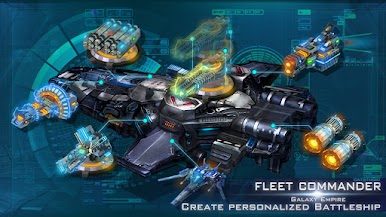
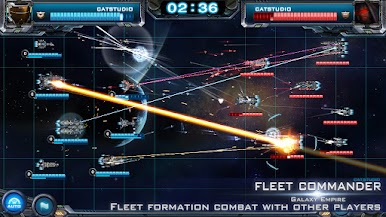
함대 사령관으로서 당신은 수백 가지의 다양한 무기로 당신의 함대를 주문 제작할 수 있습니다. 기관총에서 대포, 미사일, 레이저에서 전투기까지 대용량의 대포로 항공기를 탐험하십시오. 자신의 취향과 게임 전략에 따라 완벽한 전함을 디자인하십시오. 드라이브를 타고 우주 탐험! 또한 다른 플레이어와 대결하여 함대 대형을 설계 할 수도 있습니다.
이 게임에서는 21 개의 정상적인 행성과 끝없는 블랙홀, 성운 등 수십 개의 행성에 도전 할 수 있습니다. PVP 모드는 많은 플레이어에게 도전적이며, 플레이어는 군단을 구성하고 다른 플레이어와 얼라이언스를 잡고 영토를 캡처하고 빌드 할 수 있습니다 너 자신의 우주 제국.
지금 가입하십시오.이 장엄한 은하계 전함 전략 게임으로 엄청난 흥분과 재미를 즐기십시오! 그리고 진짜 함대 사령관이 되어라!
풍모:
- 다양한 무기 및 기타 추가 기능으로 함대를 결합, 액세서리 및 사용자 정의하십시오.
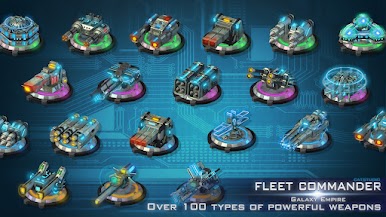
- 10 종류의 전함과 100 종류의 무기 중에서 선택할 수 있습니다.
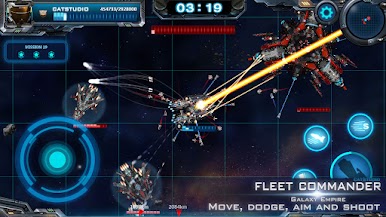
- 원하는대로 이동, 대피, 조준, 슛 제어
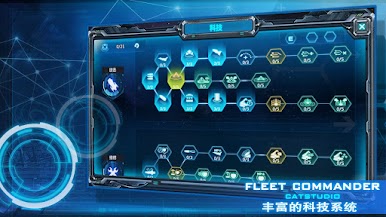
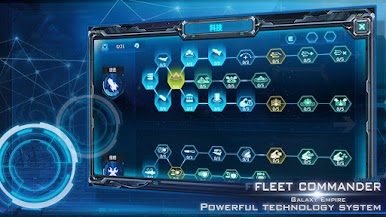
- 플레이어는 기술 점수 할당을 자유롭게 조정할 수 있습니다.
- 함대 형성을 준비하고 다른 플레이어와의 전투를 요구하십시오.
- 전함 함대와 은하의 화려 함을 시각적으로 축하합니다.
함대 사령관으로서 당신은 수백 가지의 다양한 무기로 당신의 함대를 주문 제작할 수 있습니다. 기관총에서 대포, 미사일, 레이저에서 전투기까지 대용량의 대포로 항공기를 탐험하십시오. 자신의 취향과 게임 전략에 따라 완벽한 전함을 디자인하십시오. 드라이브를 타고 우주 탐험! 또한 다른 플레이어와 대결하여 함대 대형을 설계 할 수도 있습니다.
이 게임에서는 21 개의 정상적인 행성과 끝없는 블랙홀, 성운 등 수십 개의 행성에 도전 할 수 있습니다. PVP 모드는 많은 플레이어에게 도전적이며, 플레이어는 군단을 구성하고 다른 플레이어와 얼라이언스를 잡고 영토를 캡처하고 빌드 할 수 있습니다 너 자신의 우주 제국.
지금 가입하십시오.이 장엄한 은하계 전함 전략 게임으로 엄청난 흥분과 재미를 즐기십시오! 그리고 진짜 함대 사령관이 되어라!
풍모:
- 다양한 무기 및 기타 추가 기능으로 함대를 결합, 액세서리 및 사용자 정의하십시오.
- 10 종류의 전함과 100 종류의 무기 중에서 선택할 수 있습니다.
- 원하는대로 이동, 대피, 조준, 슛 제어
- 플레이어는 기술 점수 할당을 자유롭게 조정할 수 있습니다.
- 함대 형성을 준비하고 다른 플레이어와의 전투를 요구하십시오.
- 전함 함대와 은하의 화려 함을 시각적으로 축하합니다.

PC에서 Fleet Commander 플레이해보세요.
-
BlueStacks 다운로드하고 설치
-
Google Play 스토어에 로그인 하기(나중에 진행가능)
-
오른쪽 상단 코너에 Fleet Commander 검색
-
검색 결과 중 Fleet Commander 선택하여 설치
-
구글 로그인 진행(만약 2단계를 지나갔을 경우) 후 Fleet Commander 설치
-
메인 홈화면에서 Fleet Commander 선택하여 실행

