


Infinite Flight - 비행 시뮬레이터
시뮬레이션 | Infinite Flight Corporation
5억명 이상의 게이머가 신뢰하는 안드로이드 게임 플랫폼 BlueStacks으로 PC에서 플레이하세요.

Infinite Flight - 비행 시뮬레이터 PC에서 즐겨보세요
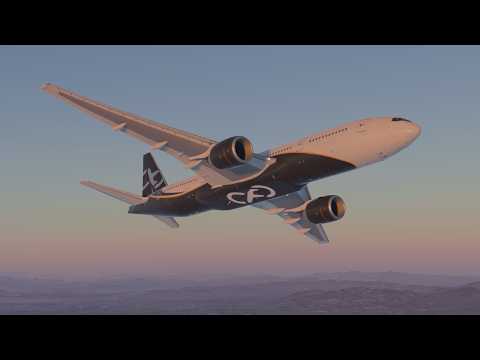
Infinite Flight는 호기심 많은 초보자와 숙련된 조종사 모두에게 모바일 기기에서 가장 포괄적인 비행 시뮬레이션을 경험할 수 있도록 해드립니다. 저희가 제공해드리는 항공기에 대한 상세한 정보로 시간대, 기상 조건 및 항공기 중량 구성을 선택하여 전 세계 다양한 지역의 풍경을 고화질로 탐험하세요.
특징:
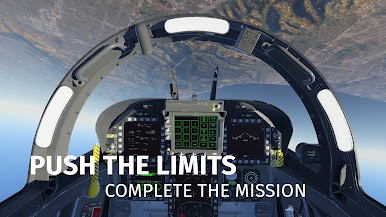
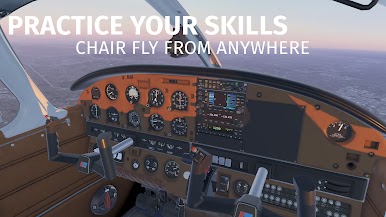
• 수십 대의 다양한 여객기, 범용 항공기 및 군용 항공기(모든 항공기의 잠금을 해제하려면 Infinite Flight Pro를 구독하세요)
• 다양한 지역의 고화질 위성 이미지, 정확한 지형, 정확한 활주로와 유도로 레이아웃을 갖춘 모든 주요 공항
• 전 세계적으로 늘어나는 3D 공항 목록
• 시간대 및 기상 조건 사용자 지정 가능(실제 시간 또는 사용자 지정)
• 태양, 달, 구름, 별이있는 현실적인 대기 조건
• 자동조종장치(모든 비행 매개 변수 제어, 비행 계획을 따르는 NAV 모드, 선택한 항공기 자동 착륙 지원)
• 정확한 수정 및 내비게이션 기능을 갖추어 손쉽게 사용할 수 있는 비행 계획 시스템
• 엔진 켜기 및 끄기
• 계기착륙장치(ILS)
• 첨단 리플레이 시스템
• 무게 및 균형 구성
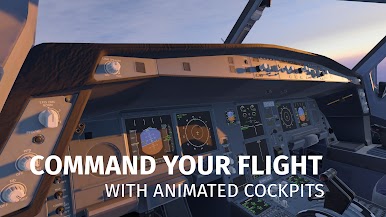
• 선택한 항공기의 항공기 조종실과 문 애니메이션, 서스펜션 애니메이션 및 윙플렉스
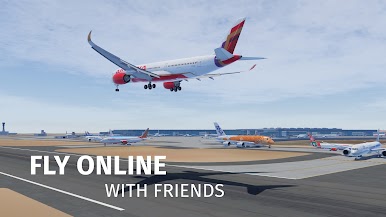
Infinite Flight Pro를 구독하시고 항공기 전 종을 선택해 전 세계 어디든지 실시간으로 비행하는 경험을 체험해보세요. 지금 바로 가장 실감 나는 온라인 비행 시뮬레이터에서 수천 명의 다른 비행사 및 항공 교통 관제사와 함께하세요!
Infinite Flight Pro 구독 혜택:
• 수천 명의 다른 비행사와 함께 글로벌한 멀티 플레이를 경험하세요
• 수백만 제곱마일에 달하는 풍경을 고화질로 즐기며 2만 5천 개가 넘는 공항을 방문해보세요(지역 제한 없음)
• 조종 가능한 모든 비행기를 즐겨보세요
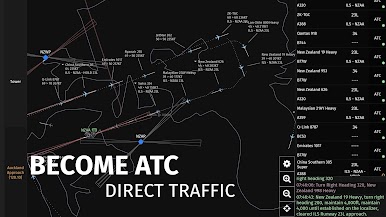
• 항공 교통 관제사를 체험해보세요
• 실시간 기상과 상층풍을 뚫고 비행하세요
구독 정보:
• 옵션: 1개월, 6개월, 12개월
• 결제는 구매 확인시 App Store 계정에서 청구됩니다.
• 현재 구독 기간이 끝나기 전에 자동 갱신 설정을 해제하지 않은 경우 자동으로 구독이 갱신됩니다.
• 구매 후 Infinite Flight App Store 페이지로 이동하여 구독을 관리하거나 자동 갱신을 끌 수 있습니다.
주의:
Infinite Flight를 이용하려면 인터넷 연결(와이파이 또는 데이터)이 필요합니다.
개인 정보 정책:
infiniteflight.com/legal/privacy
서비스 약관:
infiniteflight.com/legal/terms
특징:
• 수십 대의 다양한 여객기, 범용 항공기 및 군용 항공기(모든 항공기의 잠금을 해제하려면 Infinite Flight Pro를 구독하세요)
• 다양한 지역의 고화질 위성 이미지, 정확한 지형, 정확한 활주로와 유도로 레이아웃을 갖춘 모든 주요 공항
• 전 세계적으로 늘어나는 3D 공항 목록
• 시간대 및 기상 조건 사용자 지정 가능(실제 시간 또는 사용자 지정)
• 태양, 달, 구름, 별이있는 현실적인 대기 조건
• 자동조종장치(모든 비행 매개 변수 제어, 비행 계획을 따르는 NAV 모드, 선택한 항공기 자동 착륙 지원)
• 정확한 수정 및 내비게이션 기능을 갖추어 손쉽게 사용할 수 있는 비행 계획 시스템
• 엔진 켜기 및 끄기
• 계기착륙장치(ILS)
• 첨단 리플레이 시스템
• 무게 및 균형 구성
• 선택한 항공기의 항공기 조종실과 문 애니메이션, 서스펜션 애니메이션 및 윙플렉스
Infinite Flight Pro를 구독하시고 항공기 전 종을 선택해 전 세계 어디든지 실시간으로 비행하는 경험을 체험해보세요. 지금 바로 가장 실감 나는 온라인 비행 시뮬레이터에서 수천 명의 다른 비행사 및 항공 교통 관제사와 함께하세요!
Infinite Flight Pro 구독 혜택:
• 수천 명의 다른 비행사와 함께 글로벌한 멀티 플레이를 경험하세요
• 수백만 제곱마일에 달하는 풍경을 고화질로 즐기며 2만 5천 개가 넘는 공항을 방문해보세요(지역 제한 없음)
• 조종 가능한 모든 비행기를 즐겨보세요
• 항공 교통 관제사를 체험해보세요
• 실시간 기상과 상층풍을 뚫고 비행하세요
구독 정보:
• 옵션: 1개월, 6개월, 12개월
• 결제는 구매 확인시 App Store 계정에서 청구됩니다.
• 현재 구독 기간이 끝나기 전에 자동 갱신 설정을 해제하지 않은 경우 자동으로 구독이 갱신됩니다.
• 구매 후 Infinite Flight App Store 페이지로 이동하여 구독을 관리하거나 자동 갱신을 끌 수 있습니다.
주의:
Infinite Flight를 이용하려면 인터넷 연결(와이파이 또는 데이터)이 필요합니다.
개인 정보 정책:
infiniteflight.com/legal/privacy
서비스 약관:
infiniteflight.com/legal/terms



PC에서 Infinite Flight - 비행 시뮬레이터 플레이해보세요.
-
BlueStacks 다운로드하고 설치
-
Google Play 스토어에 로그인 하기(나중에 진행가능)
-
오른쪽 상단 코너에 Infinite Flight - 비행 시뮬레이터 검색
-
검색 결과 중 Infinite Flight - 비행 시뮬레이터 선택하여 설치
-
구글 로그인 진행(만약 2단계를 지나갔을 경우) 후 Infinite Flight - 비행 시뮬레이터 설치
-
메인 홈화면에서 Infinite Flight - 비행 시뮬레이터 선택하여 실행

