


上場企業名辞書(2020年版)
생산성 | JustSystems Corporation
5억명 이상의 게이머가 신뢰하는 안드로이드 게임 플랫폼 BlueStacks으로 PC에서 플레이하세요.

Play 上場企業名辞書(2020年版) on PC
◆ Contents of the listed company name dictionary (2020 version)
The names of the latest listed companies are recorded.
・ [Mitsubishi Corporation] Mitsubishi Corporation
・ [Nihondenshindenwa] Nippon Telegraph and Telephone
・ [Itochu Shoji] ITOCHU Corporation
・ [Eneosholdingus] ENEOS Holdings
・ [Marubeni] Marubeni
・ [Toyota Tsusho] Toyota Tsusho
◆ What is ATOK Extended Dictionary
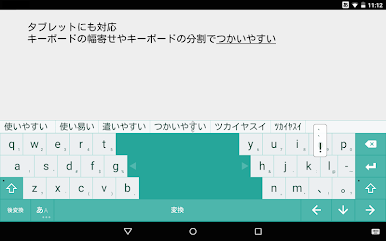
When used with ATOK, it adds words that can be converted, making typing easier.
The number of extended dictionaries that can be used in ATOK itself is as follows.
・ ATOK for Android: 10 pieces
・ ATOK for Android Passport version: 10 pieces
・ ATOK for Android trial version: 2
・ ATOK for Android medical dictionary set: 10 pieces
・ ATOK for Android Medical Dictionary Set Trial Version: 2
・ ATOK for au (au Smart Pass): 10
・ ATOK for Sugotoku (docomo Sugotoku content): 10
・ ATOK for App Pass (SoftBank App Pass): 10
* Cannot be used with pre-installed ATOK and ATOK for Android [Professional].
* ATOK extended dictionary alone does not work.
◆ Use ATOK extended dictionary
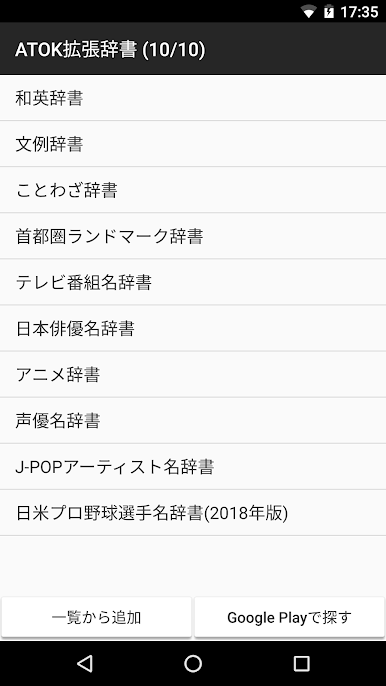
-ATOK settings- [ATOK extended dictionary] or ATOK settings [ATOK cloud service]-[ATOK extended dictionary], select [Add from list].
・ To stop using the dictionary, long-tap (hold) the dictionary name in the list and select [Delete] from the menu that opens.
▼ Operating environment / compatible models ▼
http://www.justsystems.com/jp/products/atok_android/spec.html?spec=system
▼ Online Manual ▼
http://www.justsystems.com/jp/links/atok/android/manual.html
▼ Frequently Asked Questions (FAQ) ▼
http://support.justsystems.com/jp/products/atok_android/#faq
The names of the latest listed companies are recorded.
・ [Mitsubishi Corporation] Mitsubishi Corporation
・ [Nihondenshindenwa] Nippon Telegraph and Telephone
・ [Itochu Shoji] ITOCHU Corporation
・ [Eneosholdingus] ENEOS Holdings
・ [Marubeni] Marubeni
・ [Toyota Tsusho] Toyota Tsusho
◆ What is ATOK Extended Dictionary
When used with ATOK, it adds words that can be converted, making typing easier.
The number of extended dictionaries that can be used in ATOK itself is as follows.
・ ATOK for Android: 10 pieces
・ ATOK for Android Passport version: 10 pieces
・ ATOK for Android trial version: 2
・ ATOK for Android medical dictionary set: 10 pieces
・ ATOK for Android Medical Dictionary Set Trial Version: 2
・ ATOK for au (au Smart Pass): 10
・ ATOK for Sugotoku (docomo Sugotoku content): 10
・ ATOK for App Pass (SoftBank App Pass): 10
* Cannot be used with pre-installed ATOK and ATOK for Android [Professional].
* ATOK extended dictionary alone does not work.
◆ Use ATOK extended dictionary
-ATOK settings- [ATOK extended dictionary] or ATOK settings [ATOK cloud service]-[ATOK extended dictionary], select [Add from list].
・ To stop using the dictionary, long-tap (hold) the dictionary name in the list and select [Delete] from the menu that opens.
▼ Operating environment / compatible models ▼
http://www.justsystems.com/jp/products/atok_android/spec.html?spec=system
▼ Online Manual ▼
http://www.justsystems.com/jp/links/atok/android/manual.html
▼ Frequently Asked Questions (FAQ) ▼
http://support.justsystems.com/jp/products/atok_android/#faq
PC에서 上場企業名辞書(2020年版) 플레이해보세요.
-
BlueStacks 다운로드하고 설치
-
Google Play 스토어에 로그인 하기(나중에 진행가능)
-
오른쪽 상단 코너에 上場企業名辞書(2020年版) 검색
-
검색 결과 중 上場企業名辞書(2020年版) 선택하여 설치
-
구글 로그인 진행(만약 2단계를 지나갔을 경우) 후 上場企業名辞書(2020年版) 설치
-
메인 홈화면에서 上場企業名辞書(2020年版) 선택하여 실행

