


Jokefaces - Creatore di video
Gioca su PC con BlueStacks: la piattaforma di gioco Android, considerata affidabile da oltre 500 milioni di giocatori.

Pagina modificata il: Oct 31, 2023
Run JokeFaces - Funny Video Maker on PC or Mac
Upgrade your experience. Try JokeFaces – Funny Video Maker, the fantastic Entertainment app from MmzApps, from the comfort of your laptop, PC, or Mac, only on BlueStacks.
JokeFaces is one of those face-swap video makers that just goes straight for the laugh. Pick a clip from a bunch of categories, drop in a face from the gallery or snap a quick photo, and it stitches everything into a short video or GIF. It handles solo clips and group scenes, so the whole crew can end up dancing, singing, or acting out some wild skit. There are themed templates for birthdays, proposals, baby stuff, and random goofy moments, and the library gets new bits often enough that it does not feel stale.
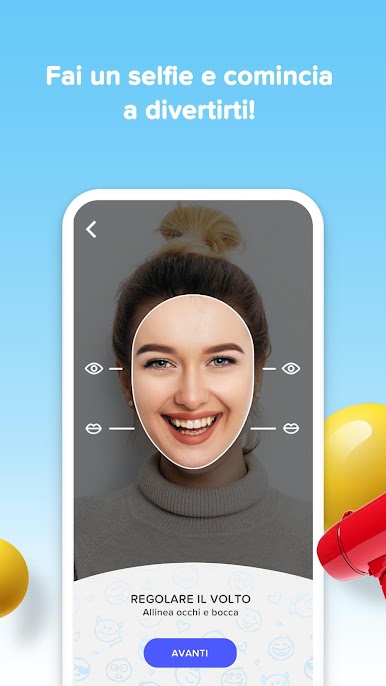
The editor is simple to use. Line up eyes and mouth, adjust a couple sliders, then let it render. Output can be GIF or MP4, and it saves cleanly to the camera roll for sharing anywhere. Results look better with a clear, front-facing photo and decent lighting. On PC with BlueStacks, the bigger screen and mouse make face alignment easier, and exports feel quicker if the computer is not slow.
Sharing to Instagram, WhatsApp, and the usual places is built in, which is half the fun. The free version is limited, so some templates will be locked. There is a Premium option with no ads and full access, offered as a monthly subscription. There is a 3 day trial and then it is currently about 14.99 USD per month, auto renews unless it is canceled in account settings ahead of time. Perfect for sending a quick joke or a silly greeting without doing heavy editing.
Ready to experience JokeFaces – Funny Video Maker on a bigger screen, in all its glory? Download BlueStacks now.




Gioca Jokefaces - Creatore di video su PC. È facile iniziare.
-
Scarica e installa BlueStacks sul tuo PC
-
Completa l'accesso a Google per accedere al Play Store o eseguilo in un secondo momento
-
Cerca Jokefaces - Creatore di video nella barra di ricerca nell'angolo in alto a destra
-
Fai clic per installare Jokefaces - Creatore di video dai risultati della ricerca
-
Completa l'accesso a Google (se hai saltato il passaggio 2) per installare Jokefaces - Creatore di video
-
Fai clic sull'icona Jokefaces - Creatore di video nella schermata principale per iniziare a giocare

