


Timecap: 습관 추적기 및 동기 부여
생산성 | Product Growth LLC
5억명 이상의 게이머가 신뢰하는 안드로이드 게임 플랫폼 BlueStacks으로 PC에서 플레이하세요.

Timecap: 습관 추적기 및 동기 부여 PC에서 즐겨보세요
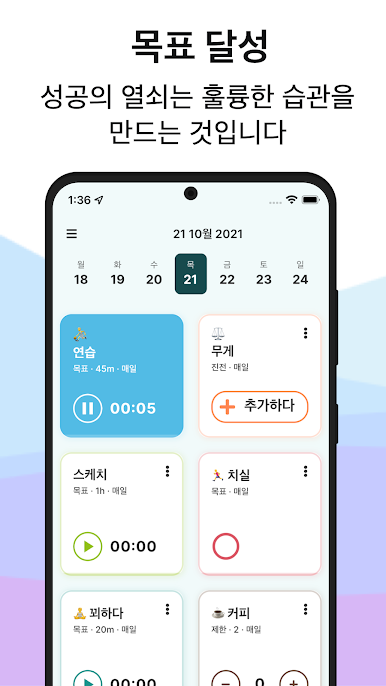
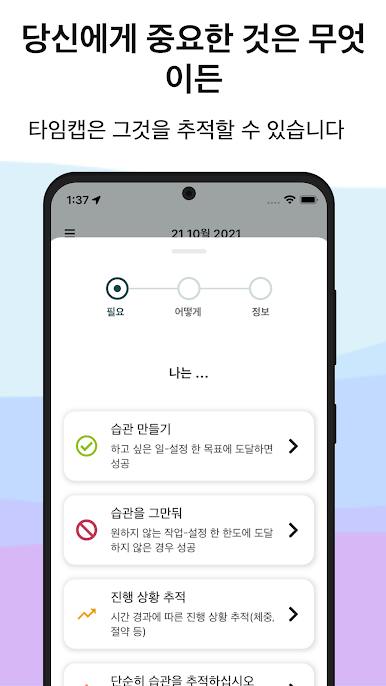
Timecap은 삶을 정리하고, 목표를 달성하고, 일상을 개선하도록 동기를 부여하는 간단한 무료 일일 습관 추적기입니다. Timecap을 사용하여 새로운 습관을 만들거나 나쁜 습관을 제한하십시오. 강력하고 사용하기 쉬운 인터페이스를 통해 놀라운 사용자 지정 옵션으로 자신만의 습관을 만들 수 있습니다.
가장 완벽한 생산성 앱으로 자신을 정리하는 방식을 바꾸세요. 산만함, 광고 없음, 당신과 당신이 도달하려는 목표만 있으면 됩니다. Timecap은 생산성에 실질적인 차이를 만들 것입니다.
무엇이 그것을 독특하게 만드는가?
Timecap을 사용하면 다음과 같은 여러 습관 추적 옵션을 하나의 앱에서 모두 사용할 수 있습니다.
시간 추적기 - 시간을 추적하려는 모든 항목의 타이머를 설정합니다.
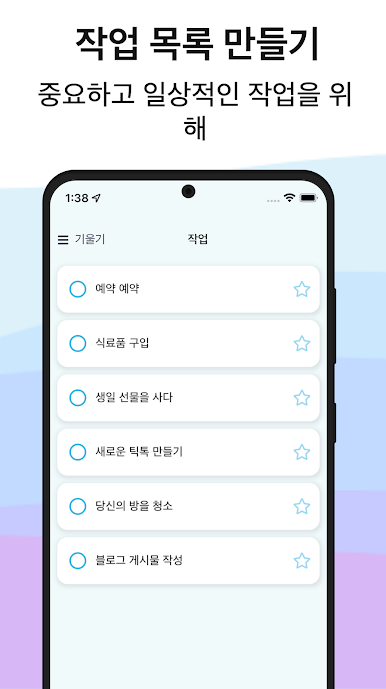
완료 가능한 활동 - 완료를 표시하는 빠르고 쉬운 방법.
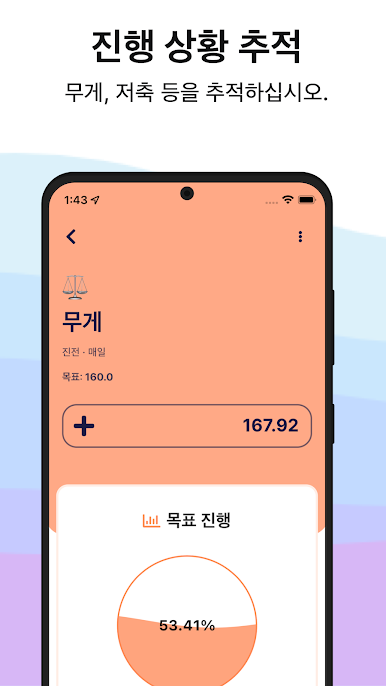
수량 카운터 - 특정 활동을 몇 번 수행했는지 계산합니다.
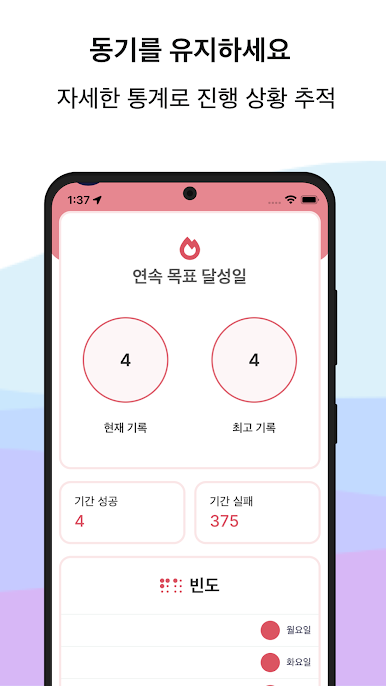
Timecap은 동기 부여를 강화하고 이 과정을 안내하여 압도당하지 않고 생산성을 유지할 수 있도록 합니다. 아름답게 디자인된 통계는 매일 동기를 부여하고 쉬운 일정은 생산성을 최적화합니다.
Timecap은 아침 루틴, 독서, 피트니스, 명상,
식수, 청소, 정기적인 치실
… 그리고 당신을 더 건강하고 생산적으로 만들 수 있는 모든 것.
또는 흡연, 음주, 소셜 미디어 사용, 게임, TV 시청과 같은 나쁜 습관을 제한합니다.
.. 그리고 목표 달성을 방해하는 모든 것.
타임캡 기능:
이 생산성 추적기의 모든 기능은 습관을 바꾸는 프로세스를 가능한 한 간단하고 동기 부여할 수 있도록 신중하게 고려됩니다.
완전히 사용자 정의 가능
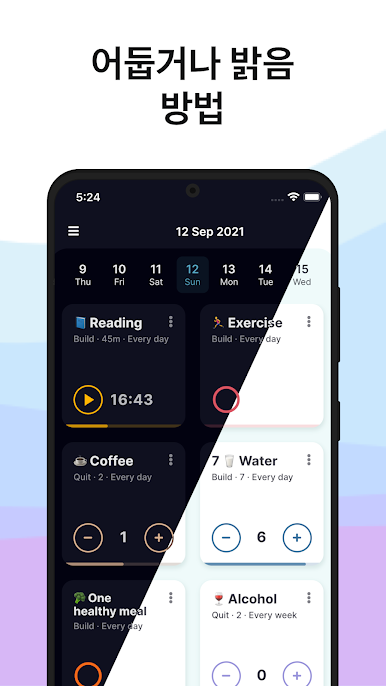
이모티콘, 서식 옵션, 다채로운 테마, 다크 모드 등과 같은 사용자 지정 기능을 통해 나만의 습관을 만들 수 있습니다. 원하는 기간(매일, 매주, 매월, 매년 또는 특정 요일)에 반복 작업을 생성할 수 있습니다.
강력한 알림 및 알림
목표에 도달하기 위해 얼마 남지 않았을 때 유용한 알림과 한계에 도달했을 때 강력한 알림. 당신에게 중요한 것을 절대 놓치지 마세요.
유용한 위젯
홈 화면에 위젯을 추가하여 습관과 작업에 쉽게 액세스할 수 있습니다.
통찰력 있는 보고서
달력 보기에서 성과와 목표를 측정하고, 성공 비율을 분석하거나, 연속 기록 카운터로 연속 기록을 추적할 수 있습니다.
데이터 동기화 및 백업
Timecap은 모든 iOS 및 Android 기기와 동기화되므로 이동 중에도 모든 작업과 할 일을 처리할 수 있습니다. 기기를 변경하기로 결정한 경우 데이터 백업을 활성화하면 됩니다.
추신 앱의 전체 기능에 액세스하고 싶지만 이를 감당할 수 없는 경우 이메일을 보내주시면 해결해 드리겠습니다.
개인 정보 보호 정책: https://timecap.app/privacy
서비스 약관: https://timecap.app/terms
가장 완벽한 생산성 앱으로 자신을 정리하는 방식을 바꾸세요. 산만함, 광고 없음, 당신과 당신이 도달하려는 목표만 있으면 됩니다. Timecap은 생산성에 실질적인 차이를 만들 것입니다.
무엇이 그것을 독특하게 만드는가?
Timecap을 사용하면 다음과 같은 여러 습관 추적 옵션을 하나의 앱에서 모두 사용할 수 있습니다.
시간 추적기 - 시간을 추적하려는 모든 항목의 타이머를 설정합니다.
완료 가능한 활동 - 완료를 표시하는 빠르고 쉬운 방법.
수량 카운터 - 특정 활동을 몇 번 수행했는지 계산합니다.
Timecap은 동기 부여를 강화하고 이 과정을 안내하여 압도당하지 않고 생산성을 유지할 수 있도록 합니다. 아름답게 디자인된 통계는 매일 동기를 부여하고 쉬운 일정은 생산성을 최적화합니다.
Timecap은 아침 루틴, 독서, 피트니스, 명상,
식수, 청소, 정기적인 치실
… 그리고 당신을 더 건강하고 생산적으로 만들 수 있는 모든 것.
또는 흡연, 음주, 소셜 미디어 사용, 게임, TV 시청과 같은 나쁜 습관을 제한합니다.
.. 그리고 목표 달성을 방해하는 모든 것.
타임캡 기능:
이 생산성 추적기의 모든 기능은 습관을 바꾸는 프로세스를 가능한 한 간단하고 동기 부여할 수 있도록 신중하게 고려됩니다.
완전히 사용자 정의 가능
이모티콘, 서식 옵션, 다채로운 테마, 다크 모드 등과 같은 사용자 지정 기능을 통해 나만의 습관을 만들 수 있습니다. 원하는 기간(매일, 매주, 매월, 매년 또는 특정 요일)에 반복 작업을 생성할 수 있습니다.
강력한 알림 및 알림
목표에 도달하기 위해 얼마 남지 않았을 때 유용한 알림과 한계에 도달했을 때 강력한 알림. 당신에게 중요한 것을 절대 놓치지 마세요.
유용한 위젯
홈 화면에 위젯을 추가하여 습관과 작업에 쉽게 액세스할 수 있습니다.
통찰력 있는 보고서
달력 보기에서 성과와 목표를 측정하고, 성공 비율을 분석하거나, 연속 기록 카운터로 연속 기록을 추적할 수 있습니다.
데이터 동기화 및 백업
Timecap은 모든 iOS 및 Android 기기와 동기화되므로 이동 중에도 모든 작업과 할 일을 처리할 수 있습니다. 기기를 변경하기로 결정한 경우 데이터 백업을 활성화하면 됩니다.
추신 앱의 전체 기능에 액세스하고 싶지만 이를 감당할 수 없는 경우 이메일을 보내주시면 해결해 드리겠습니다.
개인 정보 보호 정책: https://timecap.app/privacy
서비스 약관: https://timecap.app/terms
PC에서 Timecap: 습관 추적기 및 동기 부여 플레이해보세요.
-
BlueStacks 다운로드하고 설치
-
Google Play 스토어에 로그인 하기(나중에 진행가능)
-
오른쪽 상단 코너에 Timecap: 습관 추적기 및 동기 부여 검색
-
검색 결과 중 Timecap: 습관 추적기 및 동기 부여 선택하여 설치
-
구글 로그인 진행(만약 2단계를 지나갔을 경우) 후 Timecap: 습관 추적기 및 동기 부여 설치
-
메인 홈화면에서 Timecap: 습관 추적기 및 동기 부여 선택하여 실행

