


Name day calendar
이벤트 | Pixel IT
5억명 이상의 게이머가 신뢰하는 안드로이드 게임 플랫폼 BlueStacks으로 PC에서 플레이하세요.

Play Name day calendar on PC
Celebrate Name Days with Ease! 🌟
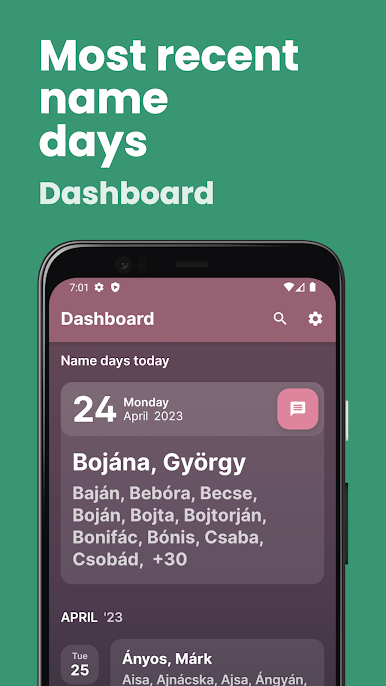
Name Days are celebrated around the world as a beautiful tradition, and our app is here to help you keep this tradition alive! Never miss a Name Day again, and make every celebration special.
— KEY FEATURES —
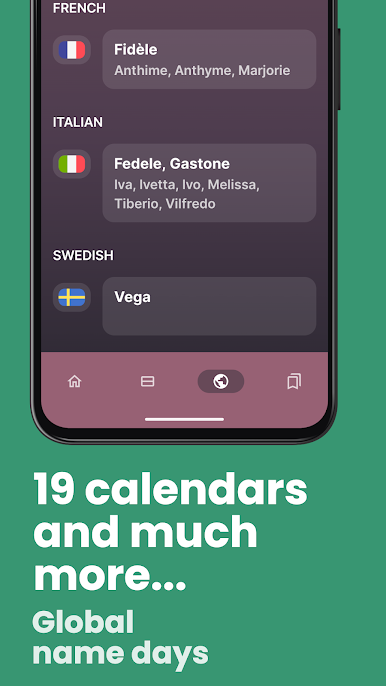
- Comprehensive Name Day Database: Our app includes Name Days for the following countries: Austria, Croatia, Czechia, Denmark, Estonia, France, Germany, Hungary, Ireland, Italy, Latvia, Lithuania, Norway, Poland, Russia, Slovakia, Spain, Sweden, and the USA.
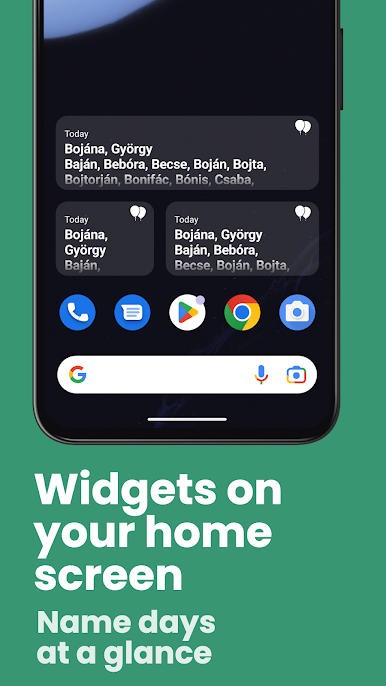
- Customizable Name Day Widget: Easily set up a widget to view today's Name Days right on your home screen.
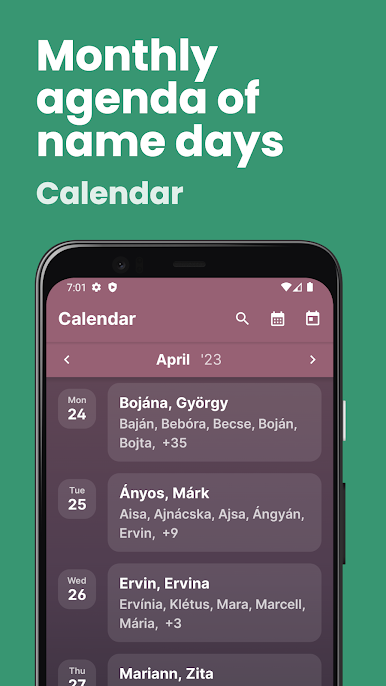
- Monthly Name Day Calendar: Browse Name Days by month and plan ahead for all your loved ones.
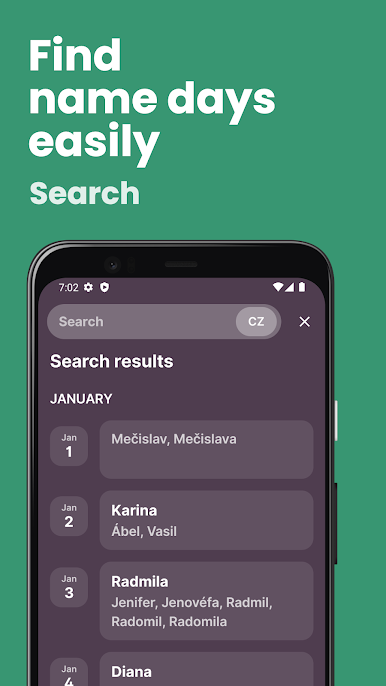
- Name Search: Quickly find celebration days by entering a name in the search bar.
- Add Custom Name Days: Can't find a name? No problem! Add your own custom Name Day to the app.
- Name Day Notifications: Receive timely reminders so you never forget to celebrate Name Days.
— FUTURE IMPROVEMENTS —
We value your feedback! Let us know what new features you’d like to see in future updates. Your suggestions help us make the app even better.
— SUPPORT & FEEDBACK —
Got questions or feedback? We're here to help! Contact us at nameday@pixelit.io
If you enjoy our app, please leave a rating and share it with friends and family! Your support helps us keep improving.
— WHAT IS A NAME DAY? —
A Name Day is a traditional celebration, rooted in Christian history, where each name is associated with a specific day of the year. Celebrated like a second birthday in many countries, Name Days are a time to honor and cherish loved ones.
On your Name Day, you might receive flowers, sweets, and even surprise visits from family and friends. It’s a day dedicated to celebrating you!
—
Make Name Day celebrations easy and memorable with our app. Download now and keep the tradition alive!
-------
Play Store screenshots generated with Screenshots.pro
Name Days are celebrated around the world as a beautiful tradition, and our app is here to help you keep this tradition alive! Never miss a Name Day again, and make every celebration special.
— KEY FEATURES —
- Comprehensive Name Day Database: Our app includes Name Days for the following countries: Austria, Croatia, Czechia, Denmark, Estonia, France, Germany, Hungary, Ireland, Italy, Latvia, Lithuania, Norway, Poland, Russia, Slovakia, Spain, Sweden, and the USA.
- Customizable Name Day Widget: Easily set up a widget to view today's Name Days right on your home screen.
- Monthly Name Day Calendar: Browse Name Days by month and plan ahead for all your loved ones.
- Name Search: Quickly find celebration days by entering a name in the search bar.
- Add Custom Name Days: Can't find a name? No problem! Add your own custom Name Day to the app.
- Name Day Notifications: Receive timely reminders so you never forget to celebrate Name Days.
— FUTURE IMPROVEMENTS —
We value your feedback! Let us know what new features you’d like to see in future updates. Your suggestions help us make the app even better.
— SUPPORT & FEEDBACK —
Got questions or feedback? We're here to help! Contact us at nameday@pixelit.io
If you enjoy our app, please leave a rating and share it with friends and family! Your support helps us keep improving.
— WHAT IS A NAME DAY? —
A Name Day is a traditional celebration, rooted in Christian history, where each name is associated with a specific day of the year. Celebrated like a second birthday in many countries, Name Days are a time to honor and cherish loved ones.
On your Name Day, you might receive flowers, sweets, and even surprise visits from family and friends. It’s a day dedicated to celebrating you!
—
Make Name Day celebrations easy and memorable with our app. Download now and keep the tradition alive!
-------
Play Store screenshots generated with Screenshots.pro
PC에서 Name day calendar 플레이해보세요.
-
BlueStacks 다운로드하고 설치
-
Google Play 스토어에 로그인 하기(나중에 진행가능)
-
오른쪽 상단 코너에 Name day calendar 검색
-
검색 결과 중 Name day calendar 선택하여 설치
-
구글 로그인 진행(만약 2단계를 지나갔을 경우) 후 Name day calendar 설치
-
메인 홈화면에서 Name day calendar 선택하여 실행

