


ラブプラス EVERY
BlueStacksを使ってPCでプレイ - 5憶以上のユーザーが愛用している高機能Androidゲーミングプラットフォーム

Play ラブプラス EVERY on PC or Mac
ラブプラス EVERY brings the Adventure genre to life, and throws up exciting challenges for gamers. Developed by KONAMI, this Android game is best experienced on BlueStacks, the World’s #1 app player for PC and Mac users.
So, ラブプラス EVERY is this dating sim where players basically hang out and build a relationship with one of three high school girls. Each character’s got her own strong personality—one’s a proper honor student, another’s kind of a quiet bookworm, and the third is a bit more mature and looks out for the others. The core idea is that you meet one of them after moving to a new town, you become friends first, and then things gradually tip over into a romance. The game doesn’t stop at the confession scene, either. Once the relationship starts, there’s all this extra stuff to do, like mini-events together and these bits where you get to talk, text, and just keep the relationship going.
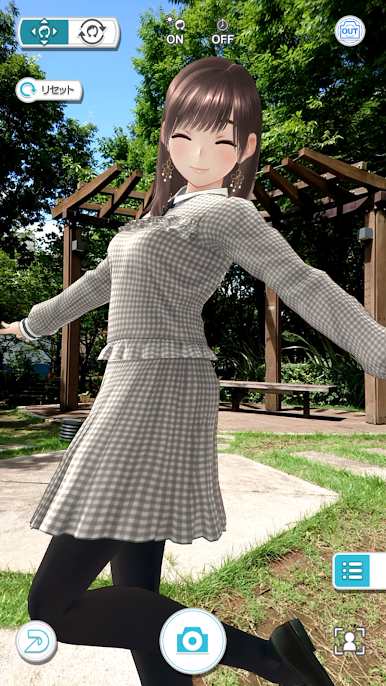
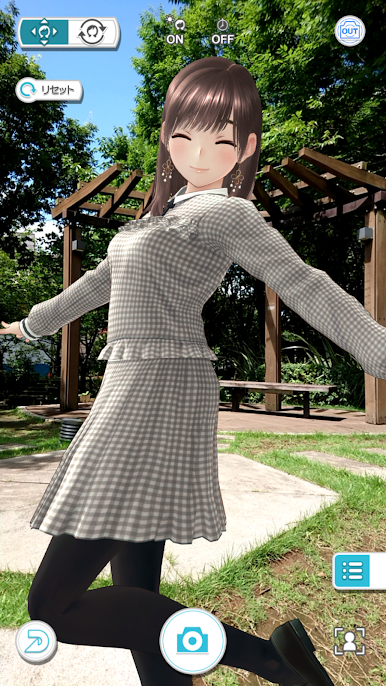
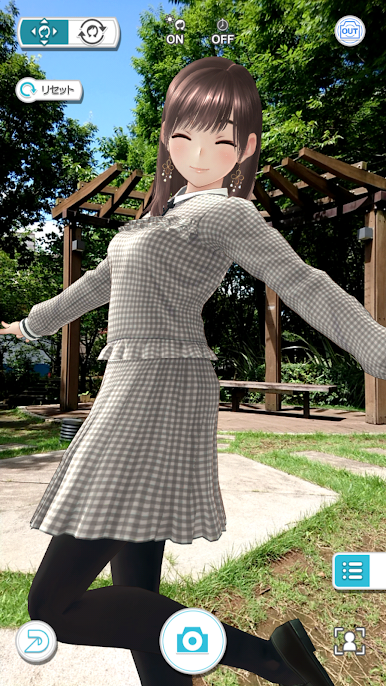
The part that really stands out is how personal it tries to feel. There are options for customizing each girl like changing her hairstyle, glasses, and personality quirks, which makes the connection feel a bit more direct. Plus, there’s this AR photo feature and even VR events—so yeah, you can actually snap photos with your virtual girlfriend or hang out in VR if you’ve got the right gear. It’s pretty surreal, and playing with BlueStacks on PC actually makes it a bit smoother, especially with all those touch and motion controls. Really, if someone’s curious about this kind of relationship game or wants to see what made this series so popular in Japan, it’s easy to get lost in all the small details and interactions. Not much focus on action—this is all about the daily moments and chatting with the characters, so it’s relaxing and chill rather than stressful or fast-paced.
Make your gaming sessions memorable with precise controls that give you an edge in close combats and visuals that pop up, bringing every character to life.















ラブプラス EVERYをPCでプレイ
-
BlueStacksをダウンロードしてPCにインストールします。
-
GoogleにサインインしてGoogle Play ストアにアクセスします。(こちらの操作は後で行っても問題ありません)
-
右上の検索バーにラブプラス EVERYを入力して検索します。
-
クリックして検索結果からラブプラス EVERYをインストールします。
-
Googleサインインを完了してラブプラス EVERYをインストールします。※手順2を飛ばしていた場合
-
ホーム画面にてラブプラス EVERYのアイコンをクリックしてアプリを起動します。

